CGGC Site Safety Academy
Safety training and site clearance for construction in Kenya, built to keep working where the signal stops.
- CGGC
- Product design, Engineering
- Web and phones, works offline
- Construction
A client project for CGGC. The people and records shown on this page are fictional.
Is this person cleared to work here, today?
Site safety has that simple question at its centre. Answering it usually means paper, spreadsheets and phone calls. The Safety Academy answers it on the spot, at the gate, with no signal.
It was built for CGGC, a contractor with crews across highway, dam and high-rise sites, to work wherever those crews do.
The whole safety loop, in one place.
- Learning. 18 courses, 59 lessons and 189 quiz questions, with certificates and a personal learning plan.
- Clearance. A badge on every phone, and a gate scanner that works with no signal.
- Field tools. A crew board, 60 toolbox talk topics, practical sign-offs and incident reports.
- HSE. Dashboards, a competency matrix, an expiry centre, the schedule, incidents and reports.
- Administration. Subcontractor views and a course builder with versions.
Safety software assumes an office. Sites aren’t offices.
No signal is normal.
A dam valley, a tunnel or a highway cutting may have no coverage for hours. If training or clearance needs a connection, it won’t happen where the risk is.
Phones are cheap and shared.
Workers use low-cost Android phones, watch their data and hand a phone to a colleague. One person’s badge and records can’t be left behind for the next.
Many languages, varied literacy.
Crews mix Kiswahili and English speakers with Chinese expatriate staff. Content has to stay short and plain in every language.
Clearance is a rule, not a list.
What a person needs depends on their site, zone, trade and activity, and certificates expire daily. A spreadsheet is wrong by the next morning.
Many companies on one site.
Subcontractors manage their own people and see nothing of anyone else’s, however they ask.
Records must stand up.
After an incident, people ask who was trained, who signed off and who let whom through the gate. The answers have to be ones nobody could have quietly changed.
Worker
Learn, show a badge, report a hazard
Own phone, often offline
Supervisor
See who’s cleared, run talks, sign off skills
Phone, at the work front
Gate officer
An instant, trustworthy yes or no
Phone at the gate, any signal
HSE officer
Compliance, expiries, incidents, reports
Desktop in the site office
Subcontractor admin
Their own company’s workers, and nothing else
Desktop or phone
- Assume no signal. Every field task has to finish on the phone. Sending it is a separate, later step.
- Never colour alone. Status always has an icon and a word, and buttons are sized for a thumb.
- Say what’s true. When the app isn’t sure of something, it says so, and it never guesses.
Learning that fits a phone and a tea break.
A plan built from their assignment.
Each worker’s plan comes from their actual site, zone, trade and activities. Today’s clearance sits at the top, followed by the one thing to do next.
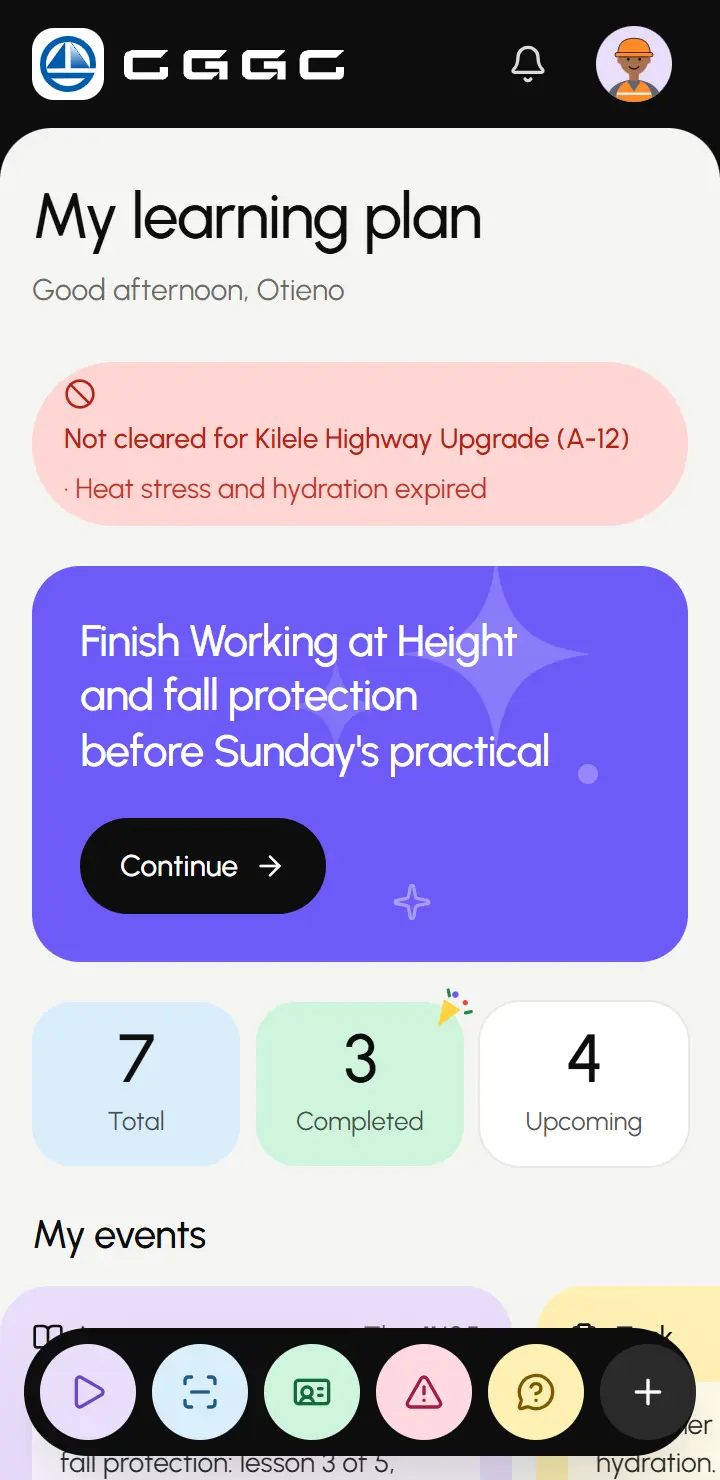
The plan, with today’s clearance and what to do next. One tap saves a whole course.
The real size is shown before it lands on a phone that watches its data. Every lesson and the quiz then open with no signal, even if they’ve never been opened.
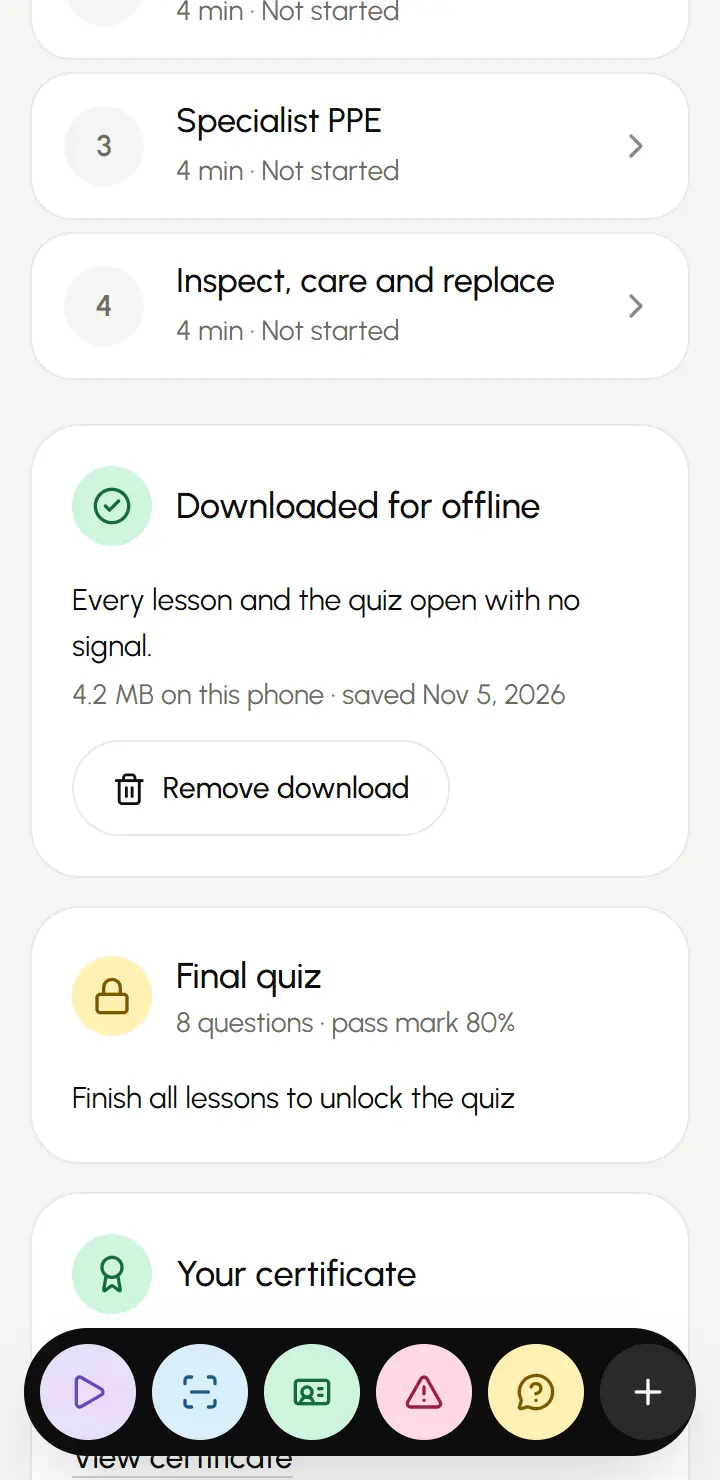
One tap saves a whole course, with its real size shown. Lessons run one step at a time.
Short steps and spot-the-hazard scenes take the place of walls of text. Finish the lessons, pass the quiz and any practical sign-off, and the certificate is issued automatically.
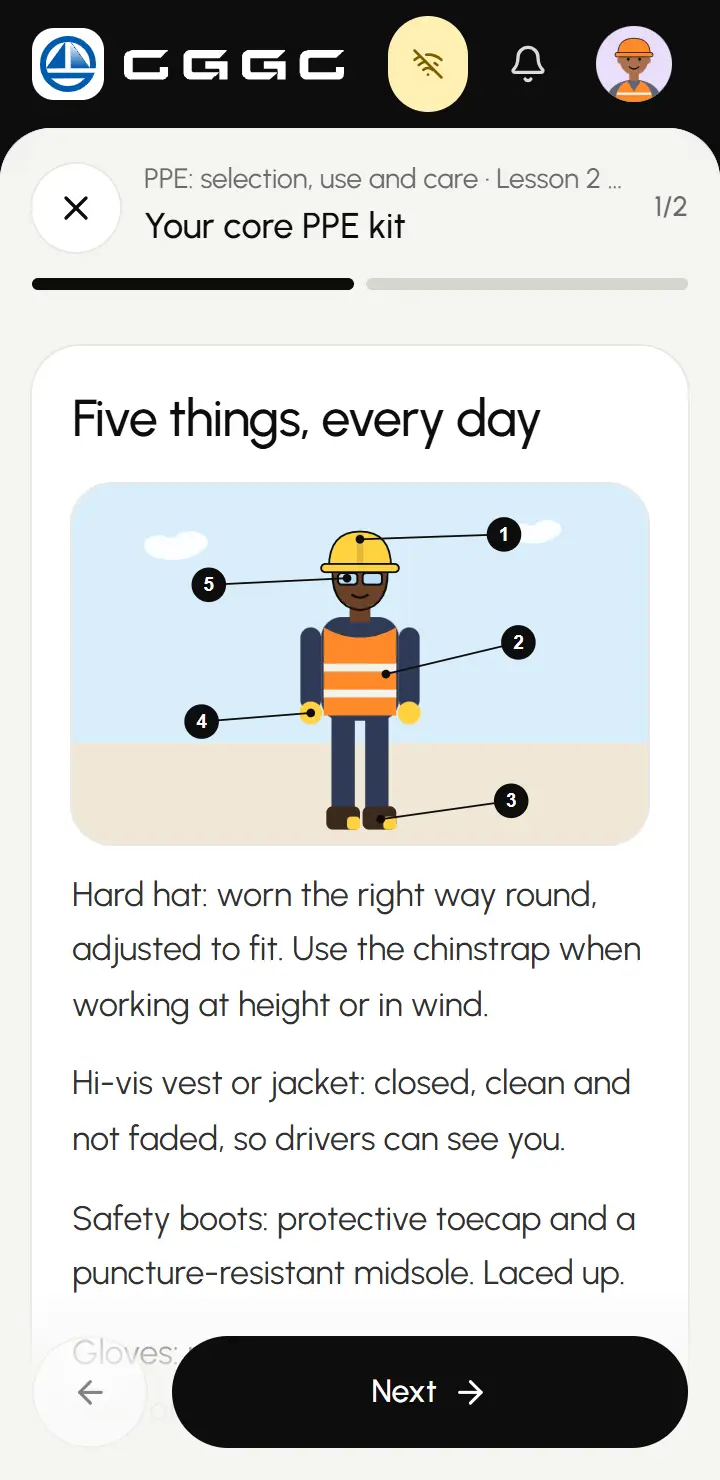
The same lesson with the network switched off.


Lessons you play, not lessons you scroll.
Spot-the-hazard scenes teach by looking. This one is redrawn for this page from the lesson in the app, so try it: tap the scene, use the keyboard, or switch to the plain list.

Find the hazards
Tap each hazard you can see. Find at least 4 of the 5 to continue.
A verdict with no signal.
Every badge carries a digital signature that can’t be faked, and lasts 24 hours. The gate’s phone checks it on the spot, and keeps its own copy of the site’s list, refreshed whenever there’s signal.
When in doubt, the answer is no. Try each case: the rules are the real ones, and this gate is rebuilt for the page.
Hold a badge to the gate
Point the camera at a badge
What the phone checks
- SignatureChecked on the phone, so it needs no connection.
- Badge ageA badge is good for 24 hours.
- Site listIf the gate’s copy is newer than the badge, the list wins.
- PhotoComes from the gate’s list, never the badge.
Nothing waiting to send. Every scan is recorded and goes up when signal returns.


Toolbox talks, anywhere.
Supervisors see who is cleared, blocked or expiring, with one tap to see what’s missing. Toolbox talks come from a 60-topic library, in the language the crew speaks, with attendance by tap or badge.
Practical sign-offs capture a checklist, photo evidence, location and signature. All of it works offline.

Who’s here?
1 of 4 present
Compliance as a live answer, not a monthly chore.
Every figure is worked out from who holds what, not typed into a report. A certificate that expires at midnight shows up the next morning, with nobody updating anything.

Clearance is a rule, not a list.
Nobody keeps this up by hand. Who’s cleared depends on what the job needs and what each person holds, so the answer changes by itself as dates pass. Move the date and watch. These six rows are samples drawn for this page.
4 Cleared
2 Blocked
| Person | Today | Site Induction | PPE: selection, use and care | Working at Height and fall protection | Lifting operations and rigging | Heavy plant and traffic management | Emergency response and evacuation | Heat stress and hydration |
|---|---|---|---|---|---|---|---|---|
| Abdi Kariuki | Cleared | |||||||
| Abdi Kilonzo | Cleared | |||||||
| Abdi Nyakundi | Cleared | |||||||
| Abdi Okello | Blocked | 13d | ||||||
| Achieng Mutua | Cleared | 22d | ||||||
| Baraka Odhiambo | Blocked |
- Valid
- 13dExpiring, days left
- Expired
- Missing


From a report to training on a plan.
A hazard isn’t closed when it’s filed. It’s closed when the people involved hold a new certificate.
ReportWorker
A worker files a hazard in four steps, even offline.
Worker without harness at the bridge edge
B4 Bridge B4 over Mto Kilele
Saved, waiting for signal
InvestigateHSE
HSE records findings. Closing needs a root cause.
Near missClosed
Root causeLack of training
AssignHSE
Corrective training goes to a crew, zone, trade or the whole site.
CourseSite Induction
Who needs itThe whole crew
ProveWorker
It only counts as done when a new certificate is issued.
Your certificateSite Induction
Issued


HSE edits lessons, quizzes and translations in a draft, so workers keep the current course until the new one is ready. Publishing checks nothing is missing, and a major update can send everyone who holds the certificate a refresher, due in 30 days.
Most apps stop when the signal does. This one carries on.
Everything done on site is saved on the phone first and sent when it can be, so a dropped connection changes nothing about the work.
- Do the work.
- It’s saved on the phone.
- It sends itself when signal returns.
- The site office has the final word.
Nothing gets counted twice
A report sent twice over a bad connection only shows up once.
A phone can’t fake a pass
Every quiz is marked again once it arrives. If the result changes, the worker gets a plain notice.
Badges can’t be forged
The gate can trust a badge with no signal, and a fake fails on the spot.
Shared phones stay private
One person’s saved pages are never shown to the next person who picks up the phone.
Signing out leaves nothing behind
It warns about anything unsent, offers to send it, then clears that person’s data, even with no signal.
Easy on data
Low-data mode uses smaller video and downloads nothing until someone presses play.
Dates take care of themselves
Nobody has to mark a certificate as expired. The moment it runs out, every screen shows it.
People’s details stay private, and the record stays honest.
- What each person can see and do is checked every time, for their role and their site.
- Nobody can quietly change the record: every action is logged, edits are refused and tampering shows.
- PINs lock after five wrong tries, and refuse easy guesses like 1234.
- Temporary PINs go straight to the person’s phone, so staff never see them.
- Only the last four digits of a national ID are kept, and duplicates are still caught.
- To a subcontractor, another company’s worker looks exactly like someone who doesn’t exist.
Tried with the signal off.
We ran it the way a site would, with the network switched off, and checked each of these.
- A worker can download a new course, finish every lesson and the quiz, show their badge and report a hazard, all with no signal.
- A supervisor can open the app and run a toolbox talk with no signal at all.
- When signal returns, everything arrives, with nothing lost and nothing doubled.
- Signing out leaves nothing personal on the phone.
- On a shared phone, one person never sees another’s pages.
- A subcontractor can’t reach other companies’ people, or HSE’s screens and exports.
- Sheet#F5F5F3
- Lilac#E9DDFB
- Sky#D8EEFB
- Mint#CFF3DF
- Butter#FFF0B3
- Blush#FFD9E1
- Hard hat#FFD23F
- Violet#6D5BF7
- Cleared#0F7A3D
- Not cleared#B42318
- Ink#0D0D0D
One system, from the trench to the site office.
A black header, a rounded sheet, one floating dock and a few soft tiles, all set in Urbanist. It stays quiet so the loud moments land: the full-screen red and green belong to the gate.
Safety Academy
Cleared
to work here,
today?
- Sheet
- Lilac
- Sky
- Mint
- Butter
- Peach
- Blush
Cleared
PPE: selection, use and careValid until Feb 10, 2028
Murithi OumaFormwork carpenter
89%cleared today
- 190 cleared
- 65 expiring
- 33 blocked
Grace Achieng
HSE officer
Cleared
Badge no. CGG-0007
Murithi Ouma
Formwork carpenter
Cleared
Badge no. CGG-0412
Not cleared
Cleared
189quiz questions
18 courses59 lessons60 toolbox talks
One dock, always within reach, with buttons sized for a thumb.
Never colour alone
Status always has an icon and a word.
- Valid
- 13 days left
- Expired
- Missing

Urbanist
Joto: kunywa kabla ya kuhisi kiu
The whole interface, in the languages a crew speaks.
Offline
4.2MB
A whole course on the phone. Every lesson and the quiz open with no signal.
Assume no signal. Never colour alone. Say what’s true.
Nuru
Donor reports from field data, without the spreadsheet in between.
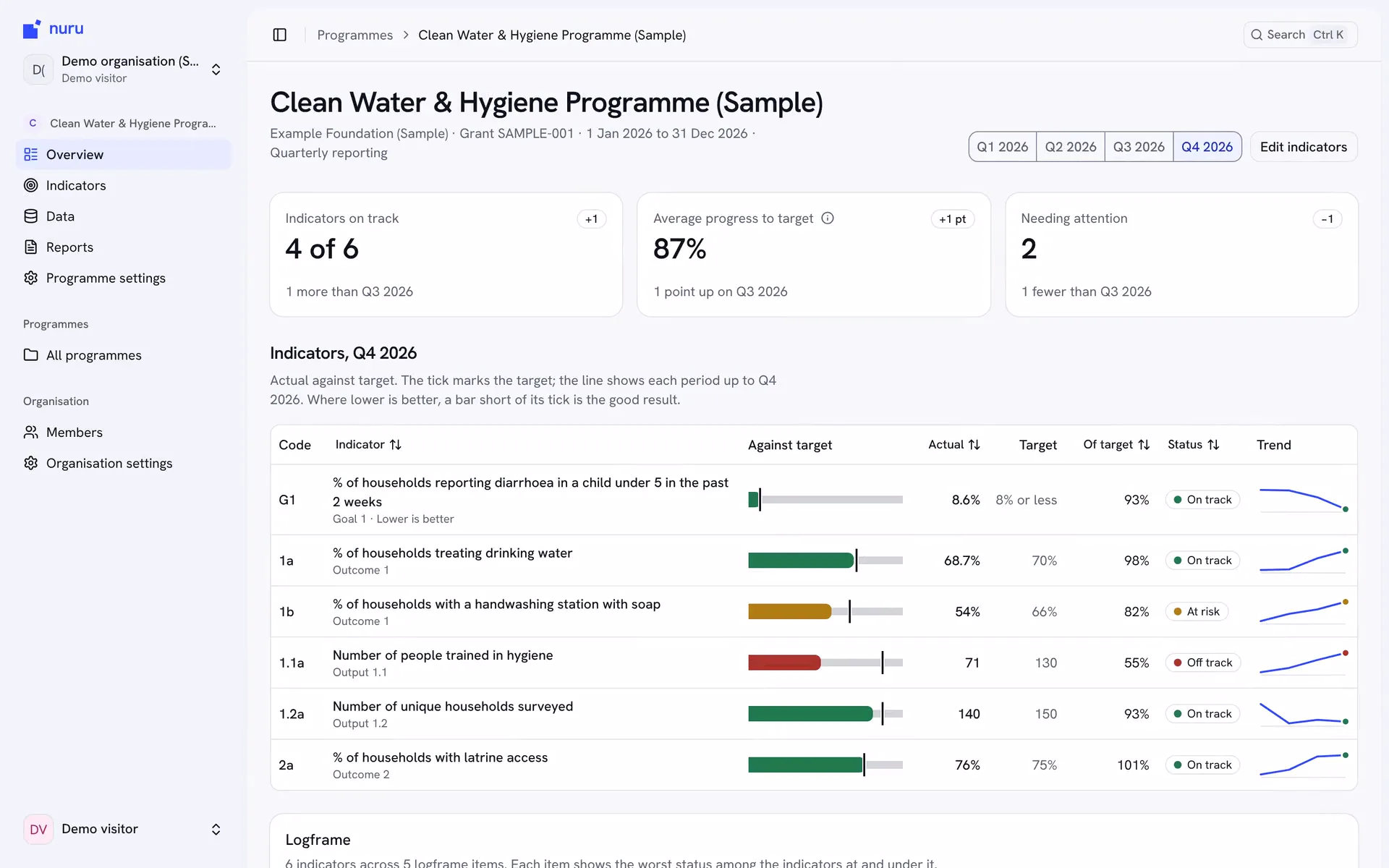
If your software stops where the signal does, we’d like to see where it breaks.
A 30-minute call is the quickest way to see if we’re the right fit. Or send us a message, whichever suits you.